Good shop, no customers? Fix your Google Business Profile in 30 minutes
Most customers check Google before they visit. A plain-English Google Business Profile checklist — category, hours, photos, reviews, posts — done in 30 minutes.

Your shop is clean. Your prices are fair. Your staff are friendly.
So why does the customer walk into the shop next door?
Because they decided before they left home. They searched "sweet shop near me" or "skin doctor in Nadiad" on Google, looked at two or three results on the map, and picked the one that looked open, busy and trusted.
That box on the map is your Google Business Profile (it used to be called Google My Business). It's free, and for most local businesses it brings more customers than the website does. Yet most profiles are half-filled.
Here's how to fix yours in about 30 minutes.

First: do you even have one?
Search your business name on Google Maps.
- You see your business with a "Claim this business" or "Own this business?" link → someone (often Google itself) created it. Click it and verify.
- You see nothing → create one at business.google.com.
- You see it, but you can't log in → the person who created it (an old employee, a past agency) still owns it. Ask them to add you as an Owner, not a Manager. More on why below.
Verification is usually a phone call, an SMS, a short video of your shop, or a postcard. Do it once and it's done.
The 30-minute checklist
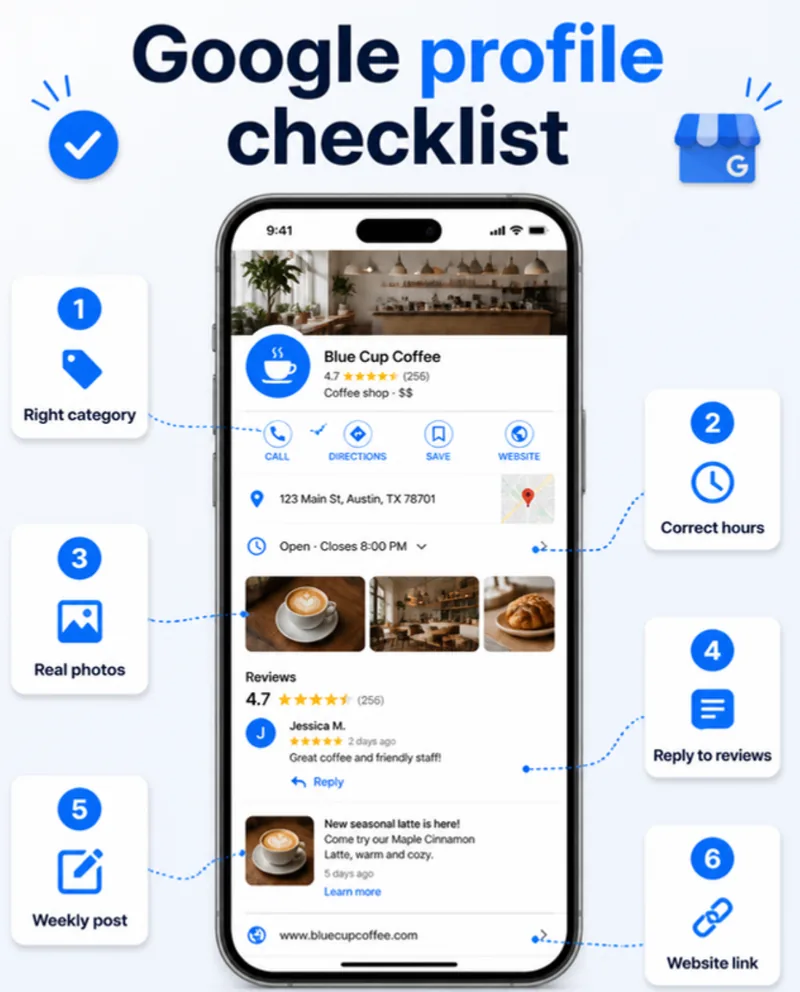
1. Pick the right main category (5 minutes)
This matters more than anything else. Google uses your primary category to decide which searches you appear in.
- Be specific. "Dentist" beats "Doctor". "Sweet shop" beats "Store".
- Add 2–4 secondary categories for other things you really do ("Bakery", "Caterer").
- Don't add categories you don't offer. It confuses Google and customers.
2. Hours that are actually true (3 minutes)
A customer who drives to a closed shop doesn't come back.
- Set normal opening hours for every day.
- Add special hours before every festival — Diwali, Navratri, Eid, Christmas. Google shows "Holiday hours may differ" if you don't.
- Closed for renovation? Mark it temporarily closed, not permanently.
3. Real photos, not stock photos (10 minutes)
Profiles with photos get more calls and direction requests, and customers trust what they can see.
Add at least:
- Outside — so people recognise the shop from the road
- Inside — counter, seating, clean space
- Products or work — your best 5–10 items
- Team — real faces build trust
- Logo and cover photo
Take them on your phone in daylight. Add 2–3 new photos every month; fresh photos tell Google the business is active.
4. Reply to every review (5 minutes, then weekly)
Reviews are the first thing people read. Your replies are the second.
- Good review: thank them by name and mention what they bought. "Thanks Priya! Glad you liked the kaju katli — see you at Diwali."
- Bad review: reply calmly, apologise for the experience, and offer to fix it offline. Never argue. Future customers are reading your reply, not just the complaint.
- Ask for reviews. Copy your review link from the profile ("Ask for reviews") and send it on WhatsApp to happy customers. Most people are happy to help — they just need the link.
Never buy reviews or post fake ones. Google removes them and can suspend the profile.
5. Products, services and a description (5 minutes)
- Write a 2–3 line description: what you sell, who it's for, where you are. Plain words — no keyword stuffing.
- Add your main services or products with prices if you can. It answers the "how much?" question before they call.
6. A post every week (2 minutes)
Profile posts show offers, new arrivals, events and news. They take two minutes from your phone:
- "New winter collection is in — open till 9 pm"
- "Free eye check-up camp this Sunday"
A profile that posts regularly looks alive. A profile with no activity for a year looks closed.
7. Link your website and WhatsApp
Add your website link, your phone number and (if you use it) WhatsApp chat. The website is where the profile sends people who want more detail — so make sure it loads fast on a phone and shows the same name, address and phone number as your profile.
That last point matters: your name, address and phone must match everywhere — Google profile, website footer, Justdial, Facebook, Instagram. Small differences ("Shop No. 4" vs "Shop 4", an old phone number) make Google less sure the listings are the same business.
Mistakes we see all the time
- The agency or old employee owns the profile. When they leave, you lose access. Always be the primary owner; give others Manager access.
- Keywords stuffed into the business name ("Sharma Sweets Best Sweet Shop Nadiad"). It's against Google's rules and can get the profile suspended. Use your real name.
- A home address shown for a service-area business. If customers don't visit you (plumber, electrician, web developer), hide the address and set a service area instead.
- Ignoring messages. Customers ask "Do you deliver?" through the profile and nobody answers. Reply within a day, or turn messaging off if you can't.
- Wrong pin on the map. Drag it to your exact entrance.
How to check it's working
Open your profile and look at Performance. You'll see how many people found you, which searches they used, and how many called, asked for directions or clicked your website. Check it once a month. If calls and direction requests go up after these changes, it's working.
Want us to check yours?
Send us your business name on WhatsApp at +91 90333 77489 and we'll check your Google profile for free and tell you the three things to fix first. If you also need a fast website for the profile to point to, see our web development services or get in touch.
And once your profile is in shape, the next step is making sure AI assistants recommend you too: does ChatGPT know your business?